Summary
This article explains how to locate a professor’s Lattes Curriculum using the CNPq Lattes Platform.
Keywords & Tags
Lattes Curriculum, professor, academic research, CNPq, Lattes Platform, faculty member
Description
The Lattes Platform is Brazil’s main academic curriculum database, maintained by CNPq. Through it, users can access academic, professional, and scientific information about professors and researchers.
Step-by-Step Instructions
Step 1: Access the Lattes Platform
- Access the CNPq Lattes Platform through the following link: https://www.lattes.cnpq.br/.
- Click on "Search Curriculum".
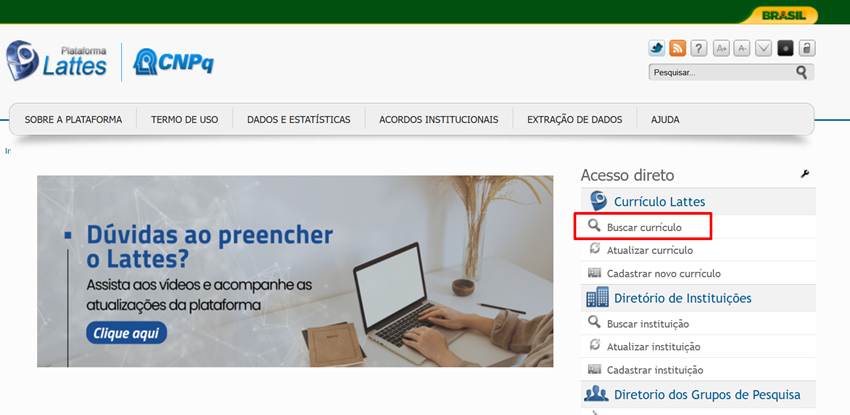
Step 2: Locate the Professor
- Enter the professor's full name (or part of the name).
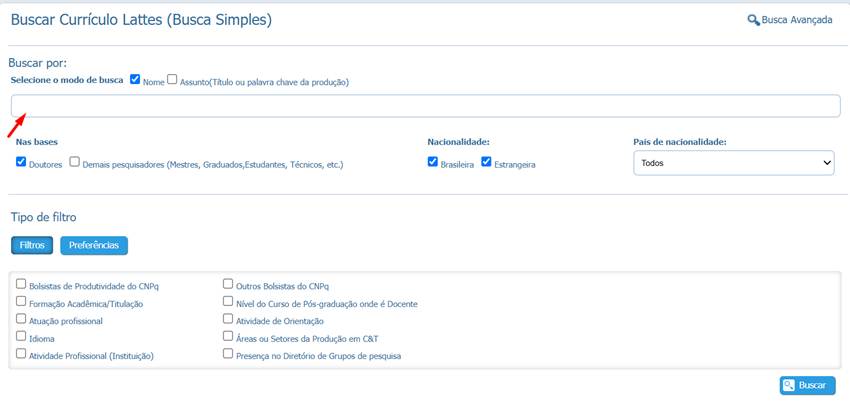
- If many results are displayed, use the available filters, such as institution or field of expertise.
- Select the desired curriculum to view the information.
Common Issues and Solutions
Issue | Solution |
I cannot find the professor I am searching for | Check the spelling of the name and try searching with only part of the name. |
Too many search results | Use filters such as institution or field of expertise. |
The curriculum appears outdated | The information is updated directly by the faculty member on the Lattes Platform. |
Relevant Links and Resources
Lattes Plataform (CNPq)
Contact Support
If you need additional assistance, please contact MUST University through the support portal.
Was this article helpful?
That’s Great!
Thank you for your feedback
Sorry! We couldn't be helpful
Thank you for your feedback
Feedback sent
We appreciate your effort and will try to fix the article