Quick answer
After Capstone approval and the grade update in the Student Portal, the Graduation Fee will become available automatically within 3 days. The fee is R$ 550.00 and it is required for the issuance and delivery of your official program completion documents.
Keywords
Graduation Fee • Diploma • Academic Transcript • Defense Minutes • Graduation • Payment • Finance • Bursar • Program Completion
Description
As stated in the Institutional Catalog and in the Enrollment Agreement, students who complete all academic requirements of the program must pay the Graduation Fee.
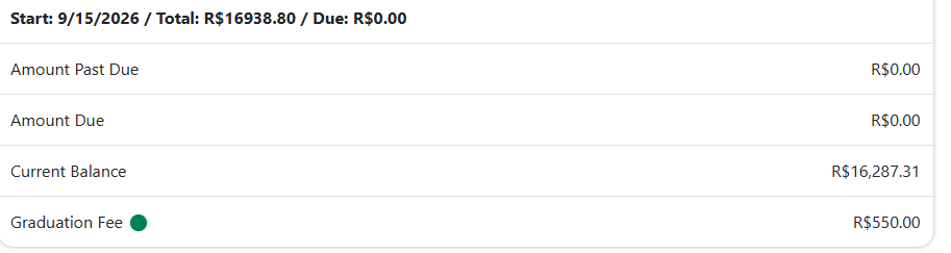
The fee is R$ 550.00.
The fee covers the issuance and online delivery of the official program completion documents:
- Diploma
- Academic Transcript
- Defense Minutes
- Approval Record
- Other graduation-related documents
This charge is available to graduating students.
You do not need to request the fee. After the Capstone grade is updated in the Student Portal, if the student has passed, the Graduation Fee will become available automatically within 3 days.
Where to find the fee
Go to the payments area in the Student Portal. The fee will be available for payment there.
Important information
Please note: there is no fixed deadline to pay this fee. However, paying it is required for the program to be considered fully completed and for the graduation process to move forward.
Didn't work? Try this
| Situation | What to do |
|---|---|
| The Graduation Fee does not appear in the Student Portal | Wait up to 3 days after your Capstone grade is updated. The fee is created automatically and does not need to be requested. |
| I made the payment, but the charge is still showing as pending | Wait for the payment to clear. If it is still pending after that, send your payment confirmation to the Finance department. |
| The portal shows an error during payment | Try again after a few minutes or use a different payment method. If the problem continues, open a ticket for review. |
See also
Was this article helpful?
That’s Great!
Thank you for your feedback
Sorry! We couldn't be helpful
Thank you for your feedback
Feedback sent
We appreciate your effort and will try to fix the article