Quick answer
This article brings together the MUST University academic flow and what each status means: Active Student, LOA/PLOA, SAP Warning, SAP Probation, SAP Appeal, Capstone, Dismissal, Withdraw, Reentry, Graduate, and Graduate with Outstanding Balance.
How it works
The MUST University academic flow describes the possible statuses a student can move through during the program, from active enrollment to graduation, including leave of absence, academic warning, the final capstone course, or dismissal. The diagram below summarizes these connections, and the definition of each status follows right after it.
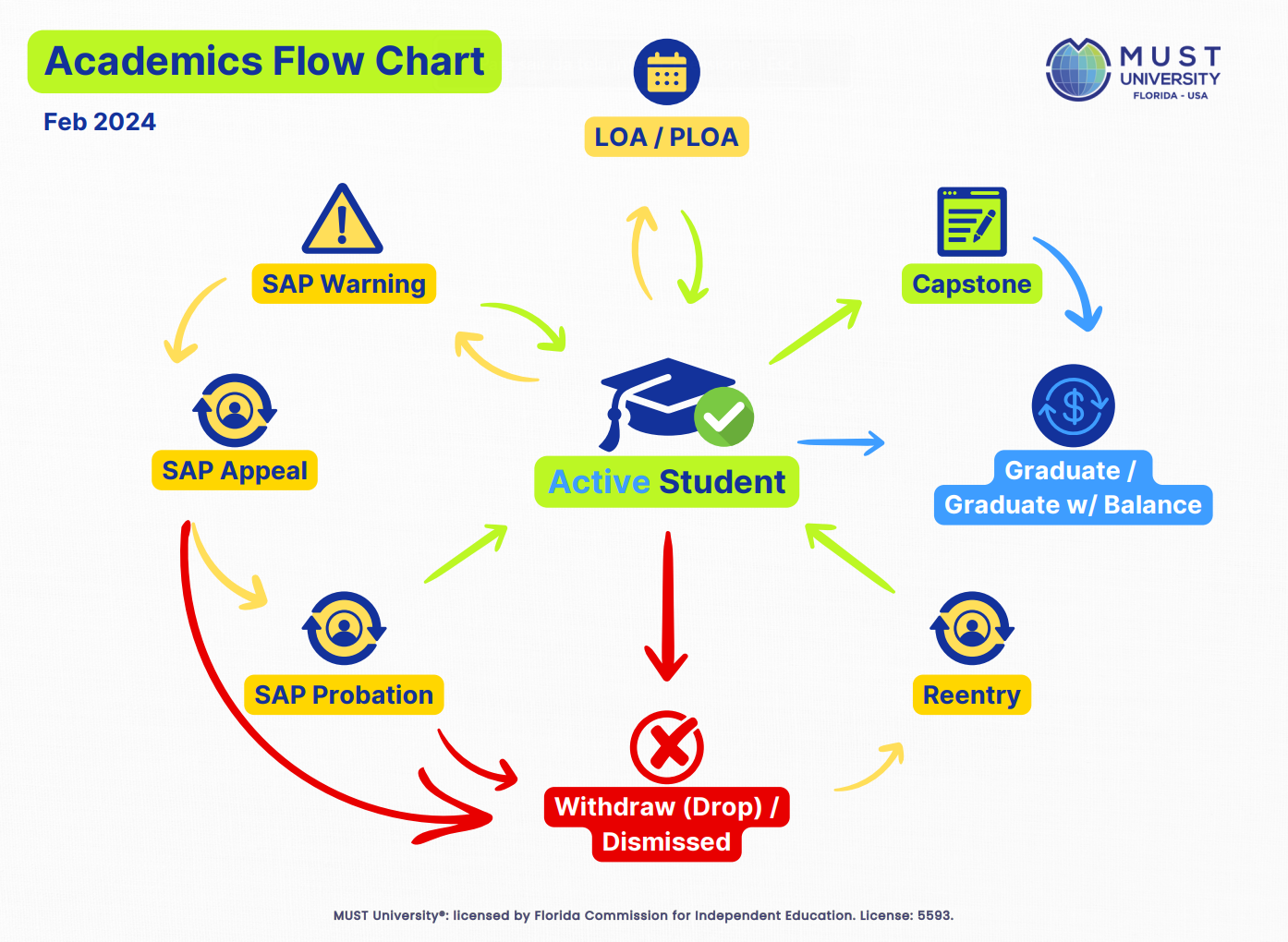
See below what each status means:
Active Student
A student who is regularly attending classes and following their educational plan as scheduled.
Capstone
The final stage of the program, available only for programs that include this course. After completing all prerequisites and receiving approval, the student has 15 weeks to complete the Capstone. If not passed, the student may retake the course once, with new approval. Any further attempts require a formal appeal.
Dismissal
Applied to students who violate the code of conduct, academic standards, or institutional policies. In these cases, the student may be dismissed from the university.
Graduate
A student who has successfully completed all the courses and requirements of their program, as set out in the Institutional Catalog.
Graduate with Outstanding Balance
A student who has completed all program courses and requirements but has not yet settled their financial obligations. Once the balance is paid, the status changes to Graduate.
LOA / PLOA
A Leave of Absence (LOA) or Personal Leave of Absence (PLOA) authorized for students facing temporary difficulties. The student must return to classes within their assigned deadline to avoid dismissal.
Reentry
Applies to previously enrolled students who were dismissed (due to withdrawal, non-attendance, or formal dismissal) and request to return to the university. Once approved, the student is considered a Reentry student until classes begin.
SAP Appeal
An appeal available to students who fail to meet the requirements of their Academic Warning Plan (SAP Warning). The appeals committee reviews the case and decides whether to grant one additional semester, with SAP Probation status, or to apply dismissal.
SAP Probation
A probationary period granted after a SAP Appeal is approved. The student receives a new academic plan and must meet the progress criteria set out in that plan.
SAP Warning
A warning applied to a student who has not met the required Satisfactory Academic Progress (SAP) criteria. The student receives an improvement plan, with a 15-week deadline to meet the criteria.
Withdraw
Applied to students who do not attend classes, are not on LOA/PLOA, do not meet their financial obligations, or do not meet SAP criteria. These students are dismissed from the university but may request reentry.
Frequently asked questions
I got a SAP Warning. What happens now?
You receive an improvement plan with a 15-week deadline to meet the required academic progress criteria. If you cannot complete the plan within that deadline, you may submit a SAP Appeal for the appeals committee to review your case.
What happens after I am dismissed from the university?
Dismissed students, whether through Dismissal or Withdraw, may request reentry at any time. Once the request is approved, the student is considered a Reentry student until classes actually begin.
Can I retake the Capstone if I do not pass it the first time?
Yes, you may retake the course once, with new approval. Any attempt beyond that requires a formal appeal.
What is the difference between Dismissal and Withdraw?
Dismissal happens due to a violation of the code of conduct, academic standards, or institutional policies. Withdraw applies to students who stop attending classes, are not on LOA/PLOA, do not meet financial obligations, or do not meet SAP criteria. In both cases, the student may request reentry.
Still not working? Do this
| Situation | What to do |
|---|---|
| I don't know which of these statuses currently applies to my enrollment | Check your current status in the Student Portal and compare it with the definitions above. If you still have questions, open a ticket with the Registrar's Office letting them know which status shows in your portal. |
| My deadline (Capstone, LOA/PLOA, or SAP Warning) is coming up | Open a ticket with the Registrar's Office at registrar@mustedu.com, stating which deadline is involved, to confirm the exact date and the options available for your case. |
| Nothing worked | Open a ticket with the Registrar's Office at registrar@mustedu.com, describing your current status and your specific question about the academic flow. |
See also
In the Knowledge Base
Was this article helpful?
That’s Great!
Thank you for your feedback
Sorry! We couldn't be helpful
Thank you for your feedback
Feedback sent
We appreciate your effort and will try to fix the article