Quick answer
This article defines every status used to track a prospect through MUST University's admissions funnel, from the first information request through active enrollment or cancellation. Check the table below whenever you need to confirm what a specific status means.
How it works
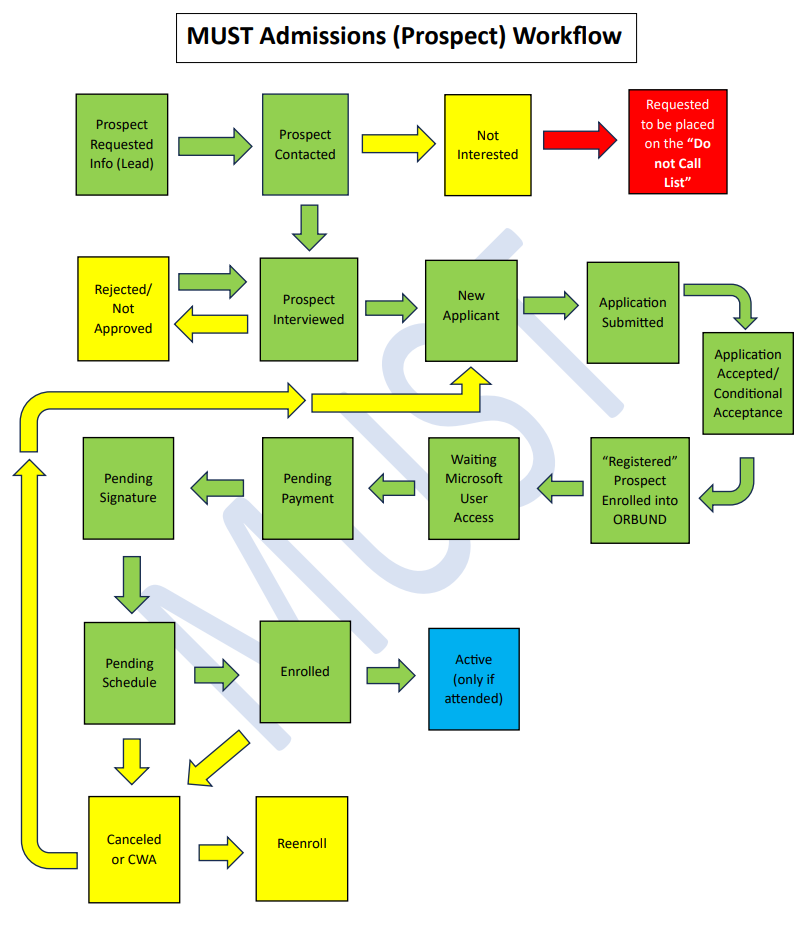
Throughout the admissions process, each prospect receives a status that shows where they are in the funnel, from the initial information request through active enrollment, cancellation, or re-entry. The table below lists every status with the official definition used by the MUST admissions team.
| Status | What it means |
|---|---|
| Information Requested by Prospect | A prospective student submitted a request (lead) asking for more information about MUST and its programs. |
| Prospect Contacted | A MUST admissions representative reached out in response to the prospect's request. The representative may schedule a call, set up an interview to provide information, or conduct the interview right away. |
| Not Interested | The prospect decided they are not currently interested in enrolling at MUST or in its programs. This also includes leads interested in a program MUST does not offer. The lead keeps this status and may be contacted again in the future for follow-up. |
| Requested to Be Placed on the "Do Not Call" List | The prospect specifically asked to be added to the do-not-call list, saying something like "please put me on the do-not-call list" or "remove me from your call list." This lead will not be contacted again. |
| Prospect Interviewed | The admissions representative interviewed the prospect to check whether they meet the admission requirements, provide information about the university and its programs, and explain the enrollment process. |
| Rejected/Not Approved | The prospect was rejected or not approved for not meeting the entry requirements or for other related reasons. The lead may be contacted in the future to check whether they now meet the requirements. |
| New Applicant | The prospect applied and expressed interest in a MUST program. Submission of all required documentation is still pending. |
| Application Submitted | The applicant submitted all documentation, and the application is ready to be reviewed by the representative and/or the director of admissions. |
| Application Accepted | The documentation was reviewed and the prospect was accepted to enroll in a MUST program. |
| Conditional Acceptance | The documentation was reviewed and missing items or pending issues were identified. The prospect must submit the documents or resolve the issue to move forward. Failure to resolve it results in the application being cancelled. |
| Prospect Enrolled in ORBUND | The Registrar's Office can now enroll the prospect in the Academic Management System (ORBUND) as a future enrolled student. |
| Awaiting Microsoft User Access | The prospect is waiting to receive their Microsoft user access from the IT department. |
| Payment Pending | The prospect's record is on hold for payment processing. After the initial payment, the record can move to the next status. |
| Awaiting Scheduling | The student has already paid the initial fees, signed all documents, and is waiting to be scheduled for classes by the Registrar's Office. |
| Cancelled | The prospect's record was cancelled due to non-payment, not starting classes, or not moving forward in the enrollment process. A student with a cancelled record can re-apply, but must submit new documentation if applying for future dates. |
| CWA (Cancelled With Attendance) | The prospect started classes (recorded attendance) during the first week of the course, but decided to cancel or withdraw during the initial add/drop period, which lasts 7 calendar days. |
| Re-Entry | Any student who previously applied to a program but did not start (Cancelled status) or was classified as CWA. This status must not be applied to students who were previously Withdrawn, Expelled, or who formally left the university. |
| Active | The student attended class in the first week and had their attendance recorded. |
Frequently asked questions
What's the difference between "Cancelled" and "CWA (Cancelled With Attendance)"?
"Cancelled" applies when the prospect never had their attendance recorded for any class, due to non-payment, not starting classes, or not moving forward in the enrollment process. "CWA" applies when the student already had attendance recorded in the first week of class, but decided to cancel or withdraw within the add/drop period, which lasts 7 calendar days.
Can a prospect be contacted again after having a "Not Interested" or "Rejected/Not Approved" status?
Yes. Both statuses allow for future contact, either for follow-up or to check whether the prospect now meets the requirements. A prospect who asked to be added to the "Do Not Call" list, however, should not be contacted again.
What's the difference between "Re-Entry" and "New Applicant"?
"New Applicant" is used for someone applying for the first time. "Re-Entry" is used for someone who already applied to a MUST program before, but did not start classes (Cancelled status) or was classified as CWA. Students who were previously Withdrawn, Expelled, or who formally left the university should not receive the Re-Entry status.
What happens if the documentation for a "Conditional Acceptance" is never resolved?
The application is cancelled. That's why it's important to closely track which documents or pending items are still missing in these cases.
Who is responsible for enrolling the prospect in ORBUND?
The Registrar's Office. This happens after the application is accepted and the prospect receives the "Prospect Enrolled in ORBUND" status.
Didn't work? Do this
| Situation | What to do |
|---|---|
| I'm not sure which status to assign to a prospect or applicant | Check the definition of each status in the table above. If you're still unsure, check with the admissions representative or the director of admissions handling the case. |
| The prospect's Microsoft access was never granted even though the status is "Awaiting Microsoft User Access" | Open a ticket with the IT department requesting that the user access be granted. |
| The prospect already paid their fees and signed the documents, but has been stuck on "Awaiting Scheduling" for a long time | Contact the Registrar's Office to check on the class scheduling. |
| None of the above solved it | Open a ticket with the MUST University Admissions team, describing the prospect's current status and the issue you're running into. |
See also
In the Knowledge Base
Was this article helpful?
That’s Great!
Thank you for your feedback
Sorry! We couldn't be helpful
Thank you for your feedback
Feedback sent
We appreciate your effort and will try to fix the article